Free YouTube 1080p Bitrate Calculator - Full HD Settings
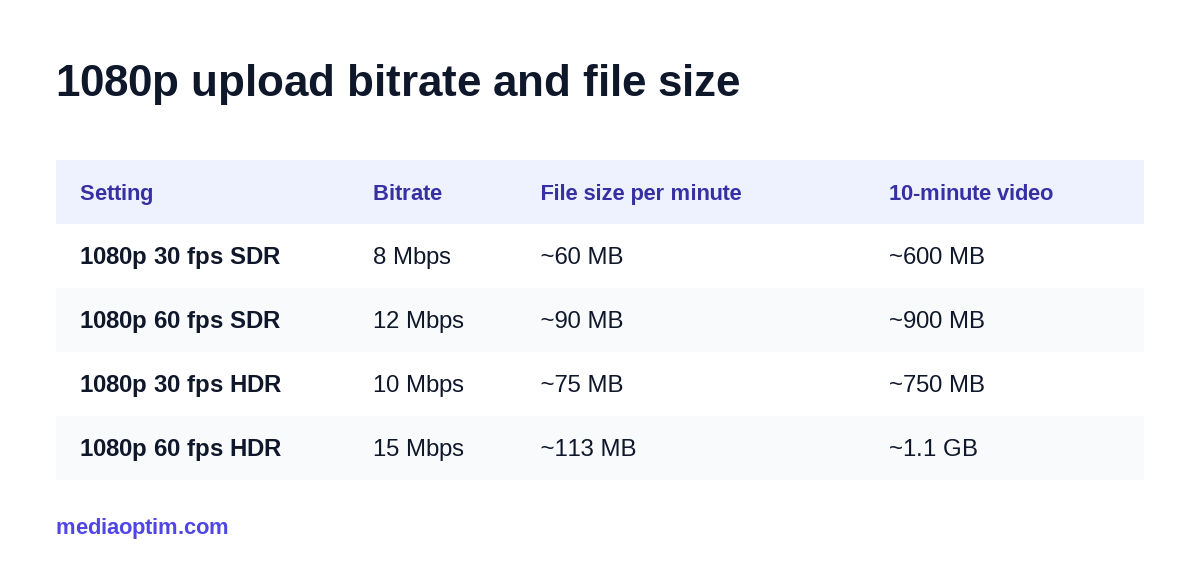
For a 1080p YouTube upload, use 8 Mbps at 24-30 fps or 12 Mbps at 48-60 fps. At 8 Mbps, one minute of video is about 60 MB and a 10-minute video about 600 MB, which uploads in minutes on most connections and gives YouTube clean material to encode.
1080p upload bitrate and file size
| Setting | Bitrate | File size per minute | 10-minute video |
|---|---|---|---|
| 1080p 30 fps SDR | 8 Mbps | ~60 MB | ~600 MB |
| 1080p 60 fps SDR | 12 Mbps | ~90 MB | ~900 MB |
| 1080p 30 fps HDR | 10 Mbps | ~75 MB | ~750 MB |
| 1080p 60 fps HDR | 15 Mbps | ~113 MB | ~1.1 GB |
Calculate Video Bitrate
Find the bitrate needed for your target size
File size is bitrate multiplied by duration: 8 megabits per second is 1 megabyte per second, or 60 MB per minute. Audio at 384 kbps adds about 3 MB per minute. If your export comes out much larger than this table, your editor is using a very high bitrate and you can lower it without a visible loss on YouTube.
Frequently Asked Questions
Is 8 Mbps enough for 1080p on YouTube?
Yes for 24-30 fps content. For 60 fps gameplay or fast sports, use 12 Mbps so motion stays clean before YouTube re-encodes it.
Should I upload 1080p as 4K to get better quality?
Some creators upscale 1080p to 1440p or 4K because YouTube streams higher resolutions with a better codec and more bitrate. It can look sharper, but the upload becomes 4-5 times larger.
More video bitrate calculator guides
Need More Power?
Compress videos, photos & audio. HEVC, WebP, AVIF, FLAC support.
$14.99 one-time
Get MediaOptim for MacFree Up Phone Storage
Compress photos & videos directly on iOS and Android.
$4.99 one-time
Get MediaOptim MobileAlso available on mobile
Free Up Your iPhone & Android Storage
Compress on-device. No uploads. No subscriptions.