Free JPG to WebP for Photography - Portfolio Optimization
For photography portfolios and galleries, WebP at quality 85-90 keeps fine detail while being 25-34% smaller than JPG. That lets you show larger, sharper images on the same page weight, which matters most on mobile connections. Every modern browser, including Safari, displays WebP.
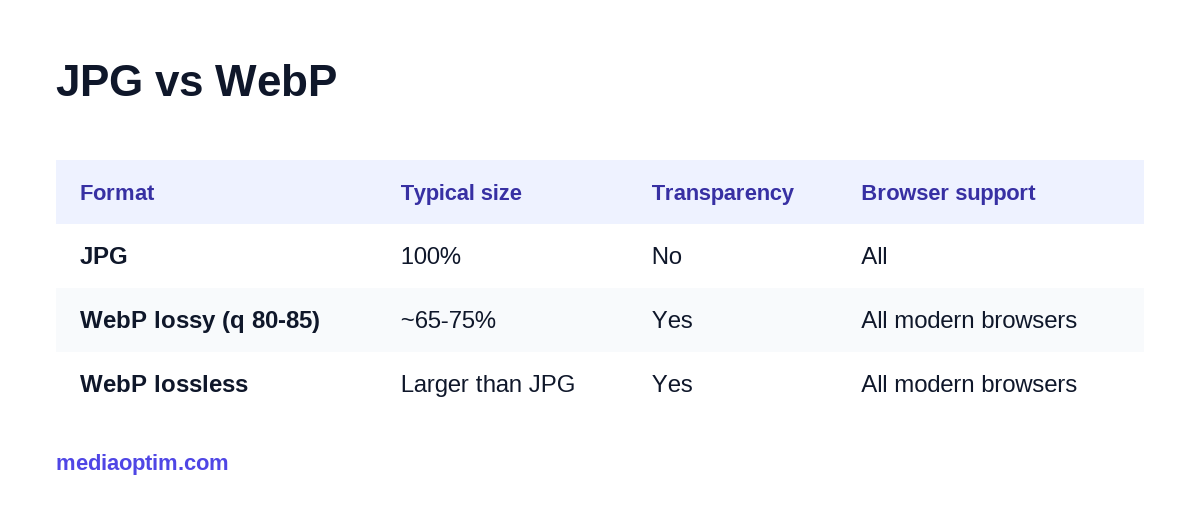
JPG vs WebP
| Format | Typical size | Transparency | Browser support |
|---|---|---|---|
| JPG | 100% | No | All |
| WebP lossy (q 80-85) | ~65-75% | Yes | All modern browsers |
| WebP lossless | Larger than JPG | Yes | All modern browsers |
Drop JPG files here or click to browse
Up to 50MB each — unlimited files
Keep your JPG or RAW masters for printing and editing, and use WebP only for the web versions. Export the longest side at the size your gallery displays, typically 2000-2560 pixels, and check skies and skin tones at 100% before publishing.
Frequently Asked Questions
Is WebP good for photography websites?
Yes. At quality 85-90 it looks the same as JPG and loads faster, so galleries feel quicker.
Does WebP keep EXIF data?
WebP can store EXIF and color profiles, but many converters strip them. Keep your JPG masters if you need the metadata.
More jpg to webp converter guides
Need More Power?
Compress videos, photos & audio. HEVC, WebP, AVIF, FLAC support.
$14.99 one-time
Get MediaOptim for MacFree Up Phone Storage
Compress photos & videos directly on iOS and Android.
$4.99 one-time
Get MediaOptim MobileAlso available on mobile
Free Up Your iPhone & Android Storage
Compress on-device. No uploads. No subscriptions.