Free Photo Print Quality Checker - Blur Detection
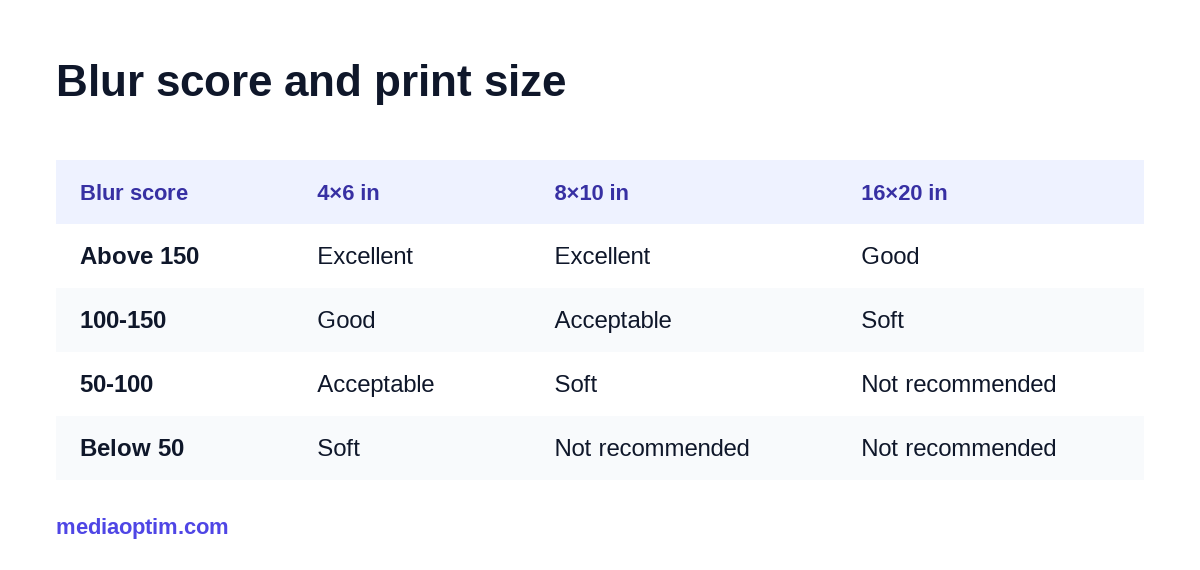
Blur that looks fine on a phone becomes obvious in a print, because prints are viewed larger and closer. Check a photo here before ordering: a blur score above 150 prints well at any size, 100-150 is fine for 4×6 and 5×7, and below 100 should only be printed small.
Blur score and print size
| Blur score | 4×6 in | 8×10 in | 16×20 in |
|---|---|---|---|
| Above 150 | Excellent | Excellent | Good |
| 100-150 | Good | Acceptable | Soft |
| 50-100 | Acceptable | Soft | Not recommended |
| Below 50 | Soft | Not recommended | Not recommended |
Drop an image here or click to browse
Up to 50MB — JPG, PNG, WebP, HEIC
Sharpness and resolution are different checks. A photo needs enough pixels for the print size (about 300 pixels per inch, so 2400×3000 for 8×10) and it also needs to be in focus. A 48-megapixel photo with motion blur still prints soft, so check both before ordering large prints.
Frequently Asked Questions
Will a slightly blurry photo look bad printed?
At 4×6 inches it often looks fine. At 8×10 and larger, softness becomes clearly visible.
What resolution do I need for printing?
About 300 pixels per inch: 1200×1800 for 4×6, 2400×3000 for 8×10 and 4800×6000 for 16×20.
More blur detector guides
Need More Power?
Compress videos, photos & audio. HEVC, WebP, AVIF, FLAC support.
$14.99 one-time
Get MediaOptim for MacFree Up Phone Storage
Compress photos & videos directly on iOS and Android.
$4.99 one-time
Get MediaOptim MobileAlso available on mobile
Free Up Your iPhone & Android Storage
Compress on-device. No uploads. No subscriptions.