Free Video Recording Storage Calculator - Plan Camera Storage
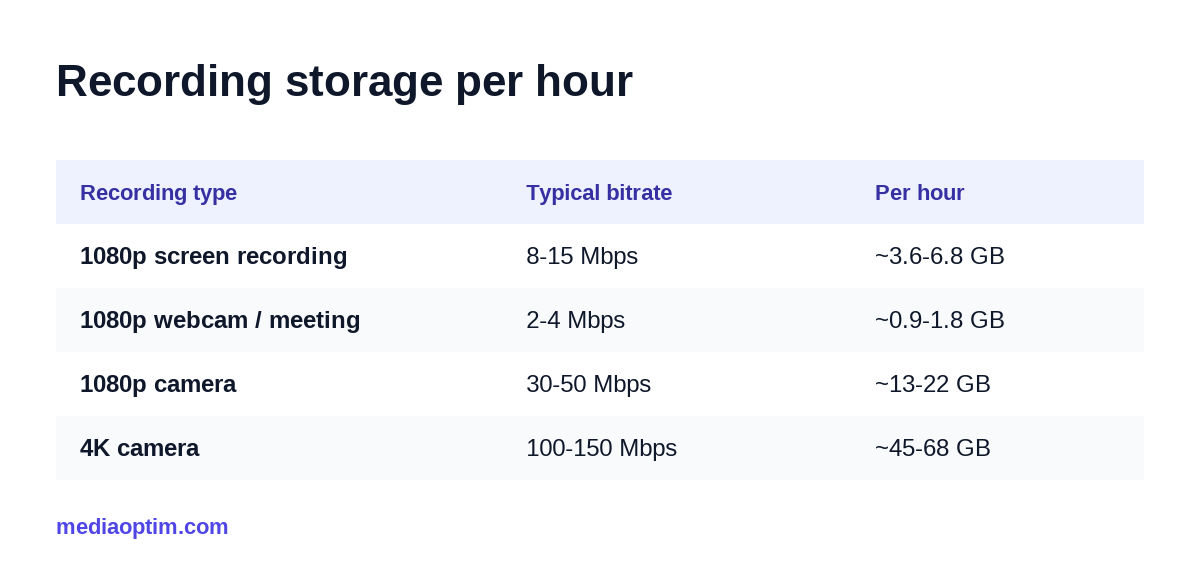
Recording file size depends on what you record: a 1080p screen recording uses about 4-7 GB per hour, a 1080p camera recording 13-22 GB per hour, and 4K camera footage 45-68 GB per hour. Plan storage at the recording bitrate, then compress the finished files.
Recording storage per hour
| Recording type | Typical bitrate | Per hour |
|---|---|---|
| 1080p screen recording | 8-15 Mbps | ~3.6-6.8 GB |
| 1080p webcam / meeting | 2-4 Mbps | ~0.9-1.8 GB |
| 1080p camera | 30-50 Mbps | ~13-22 GB |
| 4K camera | 100-150 Mbps | ~45-68 GB |
Calculate Video File Size
Estimate storage needs for your video
Recordings are usually much larger than they need to be for watching, because recorders favor speed and quality over size. Once you no longer need to edit them, re-encoding to H.265 at a delivery bitrate typically cuts recordings by 70-90%.
Frequently Asked Questions
How much storage do I need for 1 hour of recording?
About 4-7 GB for 1080p screen recordings and 13-22 GB for 1080p camera footage.
Why are screen recordings so big on Mac?
macOS screen recordings are saved at high bitrates and full Retina resolution. Compressing them to 1080p H.265 often makes them 5-10 times smaller.
More video file size calculator guides
Need More Power?
Compress videos, photos & audio. HEVC, WebP, AVIF, FLAC support.
$14.99 one-time
Get MediaOptim for MacFree Up Phone Storage
Compress photos & videos directly on iOS and Android.
$4.99 one-time
Get MediaOptim MobileAlso available on mobile
Free Up Your iPhone & Android Storage
Compress on-device. No uploads. No subscriptions.